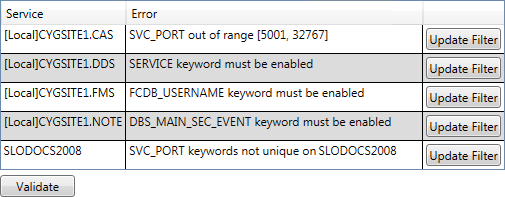
The Config File Manager contains a validation engine to check for errors in your configuration files. The validation engine examines all retrieved configuration files, not just the ones matching the filter criteria, or those displayed in the grid. Validation includes such items as which keywords must be enabled for a given service, any out of range or invalid keyword values, keyword uniqueness if required, and much more.
To Find Validation Errors in Configuration Files
Note: If the Config File Manager loads a service configuration file that contains the same keyword enabled multiple times, the utility will display the first instance of the keyword and its value, and all other instances will be disabled. When saving the service configuration file, the duplicate keywords will be automatically disabled, although the disabling will not be appear as a change in the UI or in the final validation screen.
|
|
|

